
Graphic design has become an essential skill in today’s digital world. From social media posts and websites to branding and advertisements, visual content plays a crucial role in communication and marketing. Whether you are a beginner just starting your design journey or a professional looking to enhance productivity, choosing the right graphic design tools can make a huge difference. This article explores the best graphic design tools for beginners and professionals, highlighting their features, strengths, and ideal use cases.
Why Choosing the Right Graphic Design Tool Matters
The right design tool helps you work faster, create high-quality visuals, and bring your ideas to life efficiently. Beginners need tools that are easy to learn with ready-made templates, while professionals require advanced features, customization, and precision. Fortunately, modern design software offers solutions for every skill level and budget.
Best Graphic Design Tools for Beginners
1. Canva
Canva is one of the most popular graphic design tools for beginners—and for good reason. It offers a simple drag-and-drop interface and thousands of ready-made templates for social media posts, presentations, posters, and more.
Key Features:
- Pre-designed templates
- Easy drag-and-drop editor
- Free version available
- Stock photos, icons, and fonts included
Best For: Beginners, small businesses, content creators
Canva allows non-designers to create professional-looking graphics in minutes without technical knowledge.
2. Adobe Express
Adobe Express (formerly Adobe Spark) is a beginner-friendly tool from Adobe that combines simplicity with powerful design options. It’s perfect for creating social media graphics, short videos, and web visuals.
Key Features:
- Ready-to-use templates
- Brand kit for consistent designs
- Cloud-based access
- Integration with Adobe tools
Best For: Beginners who want Adobe-quality designs without complexity
3. Figma (Beginner-Friendly Version)
Although widely used by professionals, Figma is also beginner-friendly due to its clean interface and cloud-based collaboration. It is especially popular for UI/UX design.
Key Features:
- Web-based (no installation required)
- Real-time collaboration
- Free plan for individuals
- Easy learning curve for layouts and wireframes
Best For: Beginners interested in UI/UX design
Best Graphic Design Tools for Professionals
4. Adobe Photoshop
Adobe Photoshop is an industry-standard tool used by professional designers worldwide. It is ideal for photo editing, digital artwork, and complex graphic designs.
Key Features:
- Advanced photo editing tools
- Layer-based editing
- Powerful retouching and effects
- Integration with other Adobe apps
Best For: Photo manipulation, digital art, marketing visuals
While it has a steep learning curve, Photoshop offers unmatched flexibility and control.
5. Adobe Illustrator
Adobe Illustrator is the go-to tool for vector-based designs such as logos, icons, illustrations, and typography.
Key Features:
- Scalable vector graphics
- Precision drawing tools
- Professional typography control
- Industry-standard output
Best For: Logo design, branding, illustrations
Professionals rely on Illustrator for clean, scalable designs that maintain quality at any size.
6. CorelDRAW
CorelDRAW is a powerful alternative to Adobe Illustrator, widely used for vector design and print projects.
Key Features:
- Vector illustration tools
- Print-friendly features
- One-time purchase option
- Customizable interface
Best For: Print designers and branding professionals
It’s especially popular among designers who prefer a non-subscription model.
Tools Suitable for Both Beginners and Professionals
7. Affinity Designer
Affinity Designer bridges the gap between beginner-friendly usability and professional-grade features. It is a cost-effective alternative to Adobe Illustrator.
Key Features:
- Vector and raster design support
- One-time purchase
- High performance
- Clean, intuitive interface
Best For: Freelancers and professionals on a budget
8. Inkscape
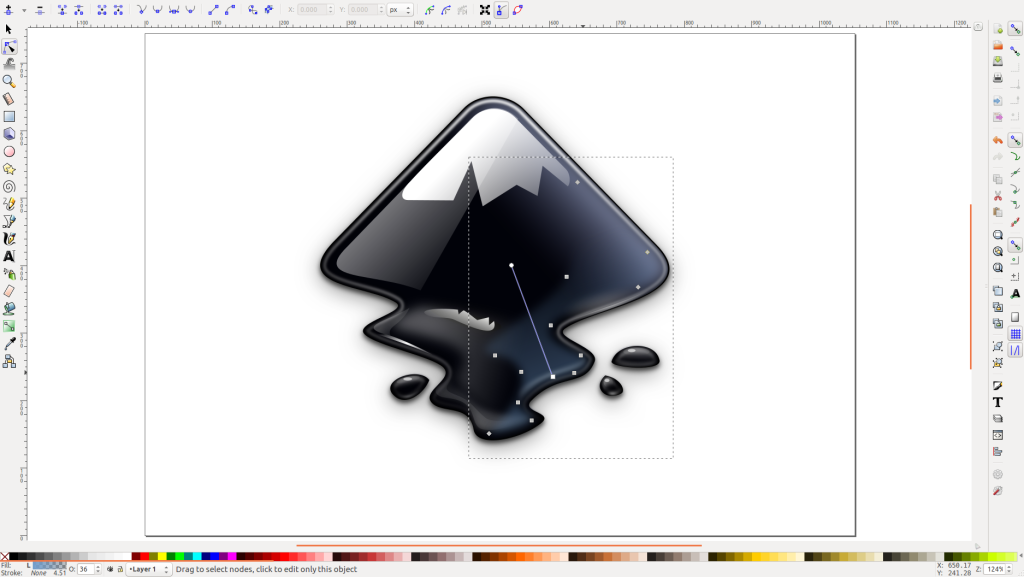
Inkscape is a free, open-source vector graphics editor suitable for both beginners and experienced designers.
Key Features:
- Free and open-source
- Vector editing tools
- Cross-platform support
- Strong community resources
Best For: Budget-conscious designers and learners
How to Choose the Right Tool for You
When selecting a graphic design tool, consider the following factors:
- Skill level: Beginners should focus on ease of use, while professionals may prioritize advanced features.
- Purpose: Social media design, branding, UI/UX, or print design all require different tools.
- Budget: Free and one-time purchase tools are great alternatives to subscriptions.
- Learning goals: Choose tools aligned with your long-term career plans.
Conclusion
Graphic design tools have evolved to cater to both beginners and professionals, making design more accessible than ever. Tools like Canva and Adobe Express are perfect for beginners who want quick results, while Photoshop and Illustrator remain essential for professional designers. Hybrid tools like Figma and Affinity Designer offer flexibility for users at any level.
Ultimately, the best graphic design tool is the one that fits your needs, workflow, and creative goals. Start with simple tools, build your skills, and gradually move toward advanced software as your confidence grows. With the right tools in hand, your design potential is limitless.